
City & Guilds LimitedRQF Level 2
City & Guilds Level 2 Diploma in IT User Skills
Zavmo teaches it and the awarding body awards it. You practise each unit one-to-one, on your own real work.
- Units Listed
- 36
- Credits
- 38
- Qualification Reference
- 600/0993/7
The Course Content. Taught Through Your World.
How Zavmo Teaches This Course to You
Bring your role, your experience and the questions you face. Explore the course through examples that mean something to you.
Bring a Question From Your Work
A Familiar Starting Point.
A project. A budget. A conversation you need to prepare. See how familiar situations can make a new idea clearer.
The examples shape the teaching. The course requirements stay the same.
From the Product
An Explanation Connected to Your Work
In this test lesson, the learner asked for an explanation using shift planning. The tutor responded through that familiar situation.
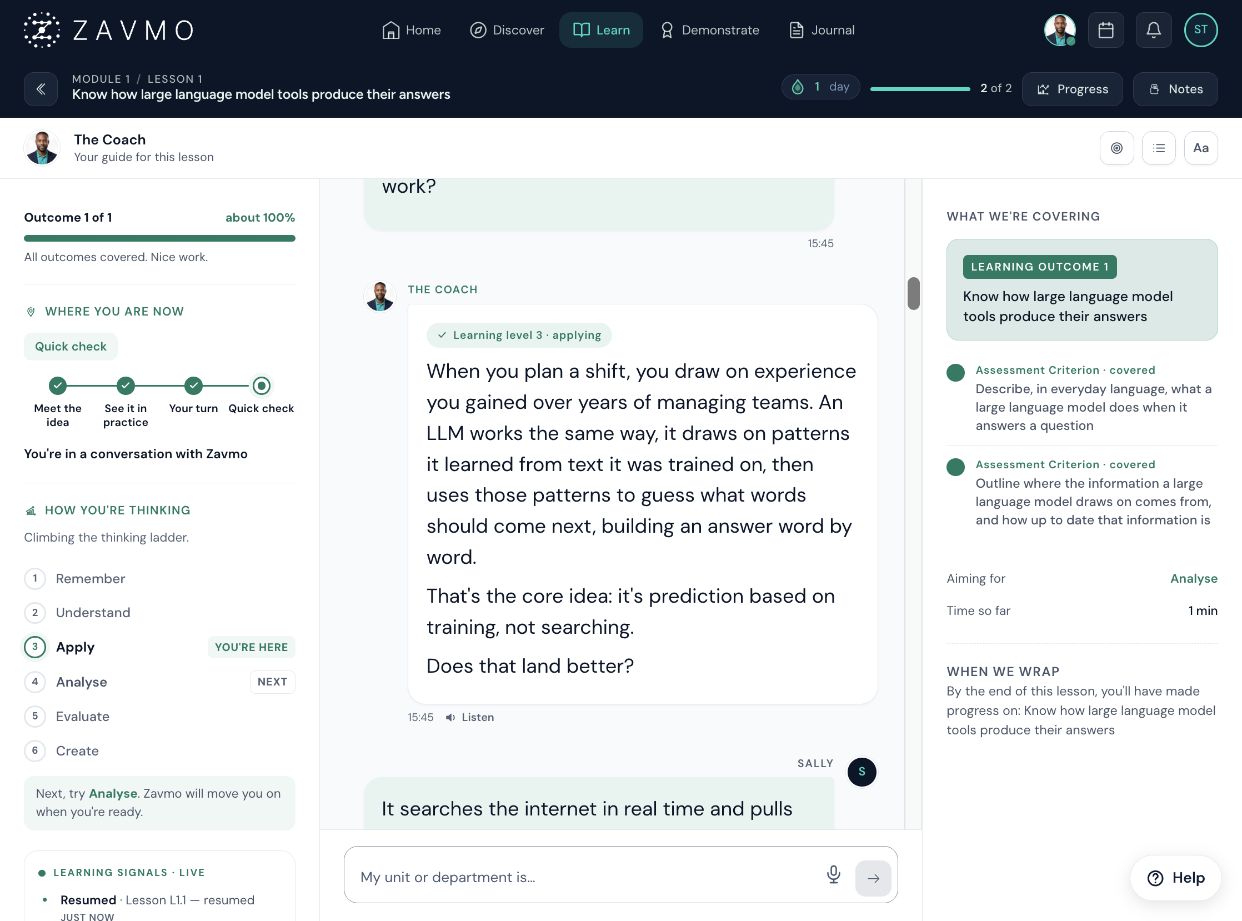
- 01 · Start With You
Your role, existing knowledge and the situation you want to understand.
- 02 · Work Through It
Ask for another explanation. Explore an example. Explain your reasoning.
- 03 · Practise the Outcome
Use what you have learnt in a relevant task, with the course outcome kept in view.
Your examples shape the teaching. They do not change the awarding body’s requirements. Use anonymised or fictional details for client situations.
How You Would Get This Certificate
- Zavmo teaches you. You learn the units one-to-one with an AI tutor, on your own work.
- You register with an approved centre. That is a college, training provider or employer City & Guilds Limited has approved to offer this qualification. Zavmo is not an approved centre, so you register with them, not with us.
- The centre assesses, and City & Guilds Limited awards. A qualified assessor at the centre judges your evidence, and the certificate comes from City & Guilds Limited.
City & Guilds offers a wide range of qualifications in Digital and IT, including Introductory, Higher Level and apprenticeship options. Learn more.
These are the units City & Guilds Limited registers against this qualification. It is a catalogue, not a syllabus. Which of them you take depends on the combination the qualification requires, and that is set by the awarding body rather than by us. Every unit here is regulated. Zavmo teaches towards them on your own work.
Zavmo is not an awarding body, is not an approved centre, and is not affiliated with City & Guilds Limited. It does the teaching and the mapping. City & Guilds Limited sets this qualification and awards it, and a qualified human assessor makes the assessment decision.
What You Will Learn in Each Unit
3D Animation Software Real unit · City & Guilds Limited
What you'll be able to do
- Prepare objects for 3D animation using appropriate software tools
- Prepare objects for 3D animation using appropriate software techniques
- Create 3D animated sequences using appropriate software tools
- Create 3D animated sequences using appropriate software techniques
3D Design Software Real unit · City & Guilds Limited
What you'll be able to do
- Prepare 3D designs in accordance with specified requirements
- Create 3D designs using appropriate software tools
- Manipulate 3D designs to achieve desired effects
- Present 3D designs effectively to communicate design concepts
3D Drawing and Planning Software Real unit · City & Guilds Limited
What you'll be able to do
- Prepare 3D plans to meet specified requirements
- Use 3D planning software tools to edit 3D plans
- Use 3D planning software techniques to edit 3D plans
- Use 3D planning software tools to manipulate 3D plans
- Use 3D planning software techniques to manipulate 3D plans
- Enhance the presentation of 3D plans using appropriate software features
Audio Software Real unit · City & Guilds Limited
What you'll be able to do
- Use audio hardware and software to capture audio sequences effectively
- Use audio software tools to combine audio sequences effectively
- Use audio software tools to edit audio sequences to a satisfactory standard
- Play and present audio sequences in a suitable format
Bespoke Software Real unit · City & Guilds Limited
What you'll be able to do
- Input information using bespoke software applications
- Organise information using bespoke software applications
- Combine information using bespoke software applications
- Use appropriate tools to edit information within bespoke software
- Use appropriate techniques to process information within bespoke software
- Use appropriate techniques to format information within bespoke software
- Present information effectively using bespoke software
Computerised Accounting Software Real unit · City & Guilds Limited
What you'll be able to do
- Access accounting information within a computerised accounting software system
- Enter accounting information accurately and efficiently into the software
- Edit accounting information to ensure data integrity and accuracy
- Select appropriate tools within the software to process various business transactions
- Use relevant techniques to process business transactions effectively
- Produce accounting documents that meet specified requirements
- Generate summary reports from the accounting software to fulfil reporting needs
Data Management Software Real unit · City & Guilds Limited
What you'll be able to do
- Enter data records in a data management system
- Edit data records in a data management system
- Maintain data records in a data management system
- Retrieve data records to meet requirements
- Display data records to meet requirements
Database Software Real unit · City & Guilds Limited
What you'll be able to do
- Create non-relational database tables according to requirements
- Modify non-relational database tables to meet changing needs
- Enter structured information accurately into a database
- Edit structured information within a database effectively
- Organise structured information within a database logically
- Use database software tools to run queries effectively
- Use database software tools to produce reports that meet specified requirements
Design Software Real unit · City & Guilds Limited
What you'll be able to do
- Obtain, insert and combine information from various sources for designs, ensuring accuracy and relevance
- Use design software tools to create, manipulate and edit designs, applying appropriate techniques and features
Desktop Publishing Software Real unit · City & Guilds Limited
What you'll be able to do
- Select and use appropriate designs and page layouts for publications, considering the target audience and purpose
- Input and combine text and other information within publications, including images, graphics, and tables
- Use desktop publishing software techniques to edit and format publications, including typography, colour management, and page layout
Developing personal and team effectiveness using IT Real unit · City & Guilds Limited
What you'll be able to do
- Describe how IT can support personal development.
- Use IT tools to support personal development activities.
- Explain how IT can support the development of team effectiveness.
- Review the use of IT for team activities.
- Review the use of IT for collaborative activities.
Drawing and Planning Software Real unit · City & Guilds Limited
What you'll be able to do
- Input information accurately into drawing or planning software
- Organise information effectively within the drawing or planning software environment
- Combine different types of information to create comprehensive drawings or plans
- Use appropriate tools and techniques to edit drawings or plans
- Manipulate drawing elements to achieve desired visual effects and accuracy
- Format drawings or plans to meet specific standards and requirements
- Present drawings or plans in a clear and professional manner
IT Communication Fundamentals Real unit · City & Guilds Limited
What you'll be able to do
- Select a variety of information sources to meet specific needs.
- Use a variety of information sources to meet specific needs.
- Access Internet-based information.
- Search for Internet-based information.
- Select Internet-based information.
- Use Internet-based information.
- Evaluate the fitness for purpose of Internet-based information.
- Select IT tools to communicate and exchange information safely.
- Use IT tools to communicate and exchange information safely.
- Select IT tools to communicate and exchange information responsibly.
- Use IT tools to communicate and exchange information responsibly.
- Select IT tools to communicate and exchange information effectively.
- Use IT tools to communicate and exchange information effectively.
IT Security for Users Real unit · City & Guilds Limited
What you'll be able to do
- Select appropriate procedures to monitor security risks to IT systems.
- Use appropriate procedures to monitor security risks to IT systems.
- Develop appropriate procedures to minimise security risks to IT systems.
- Select appropriate procedures to minimise security risks to data.
- Use appropriate procedures to minimise security risks to data.
IT Software Fundamentals Real unit · City & Guilds Limited
What you'll be able to do
- Select software applications to meet specific needs.
- Select software applications to solve specific problems.
- Use software applications to meet specific needs.
- Use software applications to solve specific problems.
- Enter different types of information using IT software.
- Develop different types of information using IT software.
- Format different types of information using IT software to suit its meaning.
- Format different types of information using IT software to suit its purpose.
- Present information in ways that are fit for purpose.
- Present information in ways that are appropriate for the audience.
- Make effective use of IT tools to present information.
- Make effective use of IT facilities to present information.
IT User Fundamentals Real unit · City & Guilds Limited
What you'll be able to do
- Use IT systems effectively to meet identified needs.
- Organise, store, and retrieve information efficiently using IT systems.
- Follow and understand the importance of safety and security practices when using IT systems.
- Carry out routine maintenance of IT systems and respond appropriately to routine IT system problems.
Imaging Software Real unit · City & Guilds Limited
What you'll be able to do
- Obtain information for images from various sources
- Insert information into images
- Combine different types of information within images
- Use imaging software tools to create images
- Use imaging software tools to manipulate images
- Use imaging software tools to edit images
Improving Productivity Using IT Real unit · City & Guilds Limited
What you'll be able to do
- Plan the use of appropriate IT systems and software for different purposes
- Select appropriate IT systems and software for different purposes
- Use appropriate IT systems and software for different purposes
- Review the ongoing use of IT tools and systems to ensure activities are successful
- Adapt the ongoing use of IT tools and systems to ensure activities are successful
- Develop solutions to improve the ongoing use of IT tools and systems
- Test solutions to improve the ongoing use of IT tools and systems
Internet Safety for IT users Real unit · City & Guilds Limited
What you'll be able to do
- Understand the risks that can exist when using the Internet and online services
- Safeguard self and others when working online by implementing safety measures
- Take precautions to maintain data security and protect sensitive information online
- Follow legal constraints, guidelines and procedures which apply when working online to ensure compliance
Multimedia Software Real unit · City & Guilds Limited
What you'll be able to do
- Plan the content and organisation of multimedia products to meet identified needs.
- Obtain, input, and combine content effectively to build multimedia outcomes.
- Use multimedia software tools to edit and format multimedia content to meet specified requirements.
- Play and present multimedia outcomes in a suitable format.
Optimise IT System Performance Real unit · City & Guilds Limited
What you'll be able to do
- Implement strategies to keep computer hardware operating efficiently
- Implement strategies to keep computer software operating efficiently
- Manage files effectively to maintain IT system performance
- Manage files effectively to improve IT system performance
- Troubleshoot IT system problems quickly and effectively
- Respond to IT system problems quickly and effectively
- Plan routine maintenance of hardware and software
- Plan non-routine maintenance of hardware and software
- Monitor the routine maintenance of hardware and software
- Review hardware to maintain performance
- Modify hardware to maintain performance
- Review software to maintain performance
- Modify software to maintain performance
Personal Information Management Software Real unit · City & Guilds Limited
What you'll be able to do
- Use calendars to schedule appointments and meetings effectively
- Use a task list to prioritise activities in an organised manner
- Use an address book to store, organise and retrieve contact information efficiently
Presentation Software Real unit · City & Guilds Limited
What you'll be able to do
- Input text and other information within presentation slides
- Combine text and other information within presentation slides
- Use presentation software tools to structure slide sequences
- Use presentation software tools to edit slide sequences
- Use presentation software tools to format slide sequences
- Prepare a slideshow for presentation
Project Management Software Real unit · City & Guilds Limited
What you'll be able to do
- Create a project using project management software
- Define the scope and objectives of a project
- Enter information about project tasks into project management software
- Edit information about project tasks within project management software
- Enter information about project resources into project management software
- Edit information about project resources within project management software
- Update information about project progress within project management software
- Select appropriate tools to display project status
- Use appropriate techniques to display project status
- Select appropriate tools to report on project status
- Use appropriate techniques to report on project status
Set Up an IT System Real unit · City & Guilds Limited
What you'll be able to do
- Select a personal computer and associated hardware and storage media to meet specified needs
- Connect a personal computer safely with associated hardware and storage media
- Select an IT system to connect to a communication service to meet specified needs
- Connect an IT system to a communication service successfully
- Install an operating system for use on an IT system
- Configure an operating system for use on an IT system
- Install application software for use on an IT system
- Configure application software for use on an IT system
- Check that the IT system is working successfully
- Check that the communication service is working successfully
Specialist Software Real unit · City & Guilds Limited
What you'll be able to do
- Input information using specialist software.
- Organise information using specialist software.
- Combine information using specialist software.
- Use specialist software tools to edit information.
- Use specialist software techniques to process information.
- Use specialist software tools to format information.
- Use specialist software techniques to present information.
Spreadsheet Software Real unit · City & Guilds Limited
What you'll be able to do
- Use a spreadsheet to enter, edit, and organise numerical and other data effectively
- Use appropriate formulas and tools to summarise and display spreadsheet information, including calculations, charts, and graphs
- Select and use appropriate tools and techniques to present spreadsheet information effectively, considering the target audience and purpose
Understanding the potential of IT Real unit · City & Guilds Limited
What you'll be able to do
- Understand the impact of IT on business
- Understand how new and emerging technologies can impact society
- Understand how new and emerging technologies can impact the individual
- Know how IT is being used in an organisation
- Know how the introduction of new IT tools and systems can affect an organisation
- Know the methods used to enhance IT security in an organisation
Using Collaborative Technologies Real unit · City & Guilds Limited
What you'll be able to do
- Apply safe practices when working with collaborative technology.
- Apply secure practices when working with collaborative technology.
- Plan the use of IT tools for collaborative working.
- Set up IT tools for collaborative working.
- Plan the use of devices for collaborative working.
- Set up devices for collaborative working.
- Prepare collaborative technologies for use.
- Contribute to tasks using collaborative technologies.
Using Email Real unit · City & Guilds Limited
What you'll be able to do
- Use e-mail software tools to compose clear and concise messages.
- Use e-mail software techniques to format and structure messages effectively.
- Use e-mail software tools to send messages to individuals and groups.
- Manage incoming email effectively by using folders, filters, and other organisational tools.
- Apply appropriate email etiquette and security practices.
Using Mobile IT Devices Real unit · City & Guilds Limited
What you'll be able to do
- Set up a mobile device to meet specific needs.
- Use applications on a mobile device effectively.
- Use files on a mobile device effectively.
- Transfer data to a mobile device.
- Transfer data from a mobile device.
- Maintain the performance of a mobile device.
Using a computer keyboard Real unit · City & Guilds Limited
What you'll be able to do
- Use a keyboard to enter and edit alphanumeric information accurately and efficiently
- Use a keyboard to access and navigate software applications effectively
Using the Internet Real unit · City & Guilds Limited
What you'll be able to do
- Connect to the Internet using appropriate hardware and software
- Use browser software to navigate webpages effectively, utilising features such as bookmarks and history
- Use browser tools to search for information from the Internet, employing effective search strategies
- Use browser software to communicate information online, utilising email, instant messaging, and social media
- Understand the need for safety and security practices when working online, including password management and virus protection
Video Software Real unit · City & Guilds Limited
What you'll be able to do
- Use video hardware to capture sequences
- Use video software to capture sequences
- Use video software tools to edit sequences
- Use video software techniques to edit sequences
- Play video sequences
- Present video sequences
Website Software Real unit · City & Guilds Limited
What you'll be able to do
- Create website structures using appropriate markup languages (e.g., HTML)
- Create website styles using appropriate styling languages (e.g., CSS)
- Use structures and styles effectively to produce well-organised and visually appealing websites
- Select appropriate website software tools for developing websites
- Use website software features to create multiple page websites
- Develop websites with multimedia elements, such as images, audio, and video
- Incorporate interactive features into websites, such as forms and animations
- Publish websites to a web server or hosting platform
- Test websites thoroughly to ensure functionality and compatibility
- Test websites across different browsers and devices
- Test websites for accessibility and usability
Word Processing Software Real unit · City & Guilds Limited
What you'll be able to do
- Enter, edit and combine text and other information accurately within word processing documents, ensuring clarity and consistency
- Structure information effectively within word processing documents using appropriate formatting and layout techniques
- Use word processing software tools to format and present documents to a professional standard, meeting specific requirements
Free, by email
Is this the right qualification for you?
One email to help you decide: the facts, what it teaches and where to start free. With a link back here. Nothing else follows unless you confirm your address.
Juliette Denny, Zavmo's founder, writes about learning and work on LinkedIn. Follow Juliette's Learning Tribe
Study the units online with a personal AI tutor, for £70 a month. Your first Future Fluency module is free.
The Standards Behind These Units
What the job actually needs, in the words employers and awarding bodies already use for the work itself.
- Standard
Configure Digital Systems
- Standard
Implement security for a digital device
- Standard
Implement security procedures for digital systems
One email to help you decide: the facts, what it teaches and where to start free. With a link back here. Nothing else follows unless you confirm your address.
Your Credits and Who Awards Them
City & Guilds Limited awards the credits. Your Zavmo record shows what you have covered and what to work on next.
What you would be collecting
3D Animation Software3D Design Software3D Drawing and Planning SoftwareAudio SoftwareBespoke SoftwareComputerised Accounting SoftwareData Management SoftwareDatabase Software
Each one is a real unit registered against this qualification.
How you’d practise it
Practise What You Learn
With Zavmo, you practise using what you learn. Work through a task, explain your reasoning and review it with your AI tutor. Your approved centre decides how the qualification is assessed.
 The Navigator · your what-if tutor Illustration
- Bring your own plan Create
For “3D Drawing and Planning Software”, choose a plan to work through. Review its assumptions with your AI tutor and decide what you would change.
- Draft the real one Create
For “Computerised Accounting Software”, work on a draft linked to the unit. Explain what it needs to do, then review and improve it with your AI tutor.
- Map a live decision Analyse
For “Data Management Software”, choose a decision to work through. Map the options, question your assumptions and consider what could happen next.
- Lead it Apply
For “Developing personal and team effectiveness using IT”, practise explaining a decision to other people. Your AI tutor helps you make the reasoning clear and prepare for their questions.
See Your Progress
What You Could Build
This example shows the topics the qualification covers. It does not show your personal progress.
- Configure Digital Systems
- Implement security for a digital device
- Implement security procedures for digital systems
Learning That Starts With You
Learn One to One, Through Your Own Work
Work through practical tasks with your AI tutor. You explain your choices, try things out and learn at your pace.
A lesson from 3D Animation Software, one of this qualification's own units.
Applied to your own work
This unit enables learners to prepare objects for 3D animation and create animated sequences using relevant software tools and techniques. Learners will understand the functions and applications of these tools in animation creation.
- 1 Remember
- 2 Understand
- 3 Apply
- 4 Analyse
- 5 Evaluate
- 6 Create
It is £70 a month, billed monthly. Your free first module is Future Fluency, and you can cancel any time. Teaching towards this qualification begins when you subscribe.
Built for City & Guilds Level 2 Diploma in IT User Skills
36 units listed for this qualification. Check City & Guilds Limited for the required combination.
- 3D Animation Software
- 3D Design Software
- 3D Drawing and Planning Software
- Audio Software
- Bespoke Software
- Computerised Accounting Software
and 30 more in the full unit list.
Free tools
Find Your Next Step
Try a free check to see where you stand. No account needed.
See How You Will Learn
How Zavmo Teaches You
A real test lesson, with questions and practice connected to the learner’s work.
The Practical Arrangements
Teaching and the Qualification
Search and plan for free. Your first Future Fluency module is free. Further teaching is £70 a month, billed monthly. Cancel any time.
Zavmo is not the awarding body or an approved centre. Formal registration, assessment and certification are separate arrangements.
Check the awarding body’s current requirements before committing to a qualification route.
Built Around You
Your Next Step
Keep City & Guilds Level 2 Diploma in IT User Skills in view as you choose your learning. Create your free account and try a Future Fluency module before deciding whether to pay.
Continue With This CourseThis qualification is separate from the free Future Fluency module. No card needed for that module.
The title, level, credits, guided learning hours and unit learning outcomes on this page are taken from the Ofqual Register of Regulated Qualifications. Contains public sector information licensed under the Open Government Licence v3.0. Where this data comes from.
From the Blog
Read More
- Which qualification is actually worth your time Before you sign up for anything, read this. How to tell which qualification gets you the job you want, and which just costs you months you will not get back.
- How to ask your employer to pay for training (email to copy) Ask in writing, keep it short and make it about the work. A plain email you can copy, plus your legal right to request time off to train in the UK.